Flipkart Pay Later is a very convenient credit option for Indian users. But if you are not using it, facing issues like Flipkart Pay Later not working or getting messages like Flipkart Pay Later KYC expired, you might consider closing or deactivating your account for better financial control.
This tutorial will show you the step-by-step process to permanently close your Flipkart Pay Later account in 2025, without affecting your Flipkart account.
What is Flipkart Pay Later?
Flipkart Pay Later is an online pre-credit feature under which deserving customers (eligibility for Flipkart Pay Later depends on KYC and credit history) can purchase products ahead of time and repay later, either in a bill later next month or in EMIs. The service is provided by financing partners like Axis Bank and IDFC FIRST Bank. Sometimes, users see messages such as IDFC Flipkart Pay Later blocked, or may wish to close the IDFC Flipkart Pay Later account for some reason.
At times, users face problems such as Flipkart Pay Later blocked, Flipkart Pay Later charges confusion, or Flipkart Pay Later KYC issue, and might want to cancel or remove this feature altogether. In the same vein, in case you have a Flipkart Pay Later registration but no longer desire it attached, closing the account would be the most appropriate action to take.
Reasons to deactivate Flipkart Pay Later:
Before closing, it’s helpful to know why individuals might disable Flipkart Pay Later:
- Not using the service any longer.
- Do not want unnecessary credit checks on CIBIL.
- Do not want to use BNPL (Buy Now, Pay Later) for financial planning purposes.
- Flipkart KYC update pending, or the Flipkart Pay Later KYC problem is causing account restrictions.
- Privacy or security issues.
- Planning to take out other loans or credit cards.
- Struggling with bills or Flipkart Pay Later charges.
- Failed to make a successful Flipkart Pay Later payment.
- Receiving duplicate messages, such as Please clear your dues even after repayment.
- Can’t make purchases, and Flipkart Pay Later KYC has expired.
- Want to delete Flipkart Pay Later from CIBIL or deactivate the Flipkart account entirely along with it.
No matter why, this service can be closed easily and securely if done correctly.
How to close the Flipkart Pay Later online process? [Step-by-Step 2025]
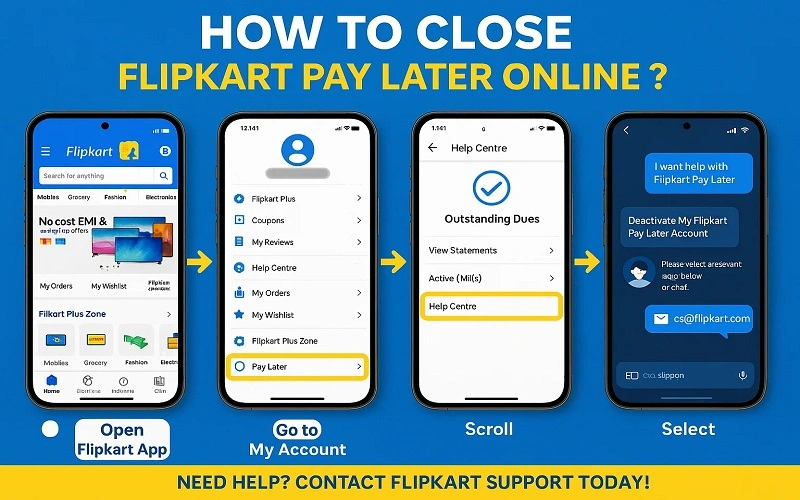
Below is the easy process to close your Flipkart Pay Later account:
1. Open the Flipkart App
Ensure you are logged into the account associated with Pay Later.
2. Go to ‘My Account’
- Tap on the bottom menu and choose ‘My Account‘.
- Scroll down to locate ‘Flipkart Pay Later‘ under the Payments section.
3. Access Pay Later Details
Click on Flipkart Pay Later to see details such as current balance, credit limit, and repayment history.
4. Verify Outstanding Dues
- If dues are present, pay them using your Flipkart Pay Later payment.
- After clearing, wait for it to update (typically within 24-48 hours).
5. Call Flipkart Customer Support
The application does not have a direct method to turn off Pay Later. You must:
- Scroll down to Help Center.
- Choose “I want help with Flipkart Pay Later”.
- Then click on “Deactivate My Flipkart Pay Later Account” or select Chat with Support.
- You can also email customer care at: cs@flipkart.com
Tip: Clearly state that you wish to permanently close your Pay Later account and confirm that all outstanding dues have been fully settled.
You can also call the Flipkart Pay Later customer care number at 1800 202 9898 for assistance with deactivating Flipkart Pay Later, closing your Flipkart Pay Later account, or resolving issues such as Flipkart Pay Later not working.
How Long Does It Take to Close Flipkart Pay Later?
After submitting your request:
- It will take 2 to 5 business days for full deactivation.
- You’ll receive confirmation via email or SMS from Flipkart and/or the lending partner (like IDFC First Bank).
Will Closing Flipkart Pay Later Impact My Credit Score?
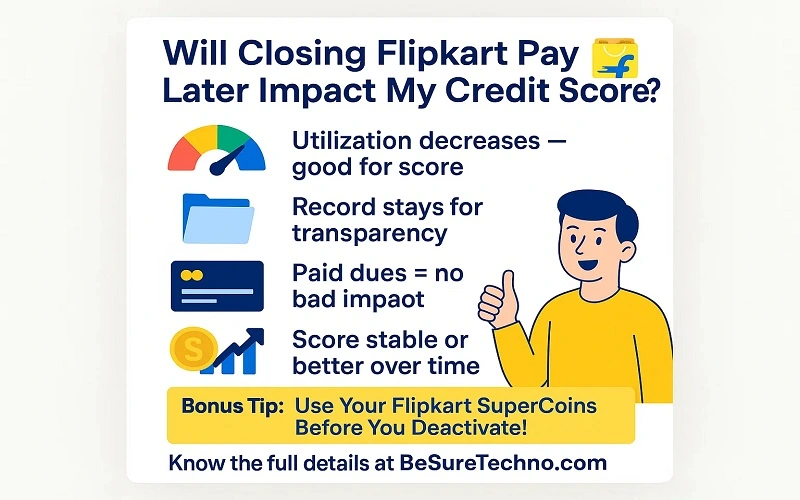
Yes, but not much and for a short while. Here’s why:
- Your utilization decreases, and that is a good thing.
- The credit record remains on your report for the sake of transparency.
- If your Flipkart Pay Later KYC and dues are fully cleared, there’s no negative impact.
- Your score will be stable or even better over time.
Bonus Tip: Utilize Your Flipkart SuperCoins Before You Deactivate.
Closing your Pay Later account, do not forget to review your SuperCoins balance. You can use SuperCoins in Flipkart to get discounts, a free subscription, or rewards on Flipkart before deactivation. Also, if you’re considering how to turn off Flipkart Pay Later for good, ensure you’ve redeemed any rewards.
Also, if you’ve been dealing with the Flipkart Pay Later option not showing or Flipkart Pay Later not available, it may be linked to a Flipkart KYC update requirement. In that case, fixing your Flipkart Pay KYC update might restore the feature instead of closing it.
Final Thoughts
Closing your Flipkart Pay Later account or Flipkart Pay Later closure is a wise financial move if you do not use it often or want to avoid accidental credit consumption. If you are trying to cancel Flipkart Pay Later, disable Flipkart Pay Later, or remove it from your credit profile, follow the above instructions carefully and confirm with customer care.
FAQs:
Ans: Go to the customer’s Flipkart app > My Account > to enable Flipkart Pay later. Click “Activate Now and verify KYC using Aadhaar or PAN” after clicking on the “Flipkart Pay Later” banner. After your identity is verified, you can start shopping, and your Pay Later account will be created.
Ans: Go to My Account → Flipkart Pay Later after starting the Flipkart app. Tap ‘Pay EMI’ or ‘Pay Now’. Choose the EMI plan you wish to activate. Choose another method for payment, like a debit or credit card, net banking, UPI, etc. Click Confirm to finish the payment. Your EMI will be successfully paid, and you will receive a confirmation.
Ans: Open the Flipkart app and go to ‘My Account → Flipkart Pay Later’. Pay the remaining bills first. Contact Flipkart Customer Support by phone or through the app if your account is still not unblocked. Once your dues are cleared and your KYC is confirmed, your Pay Later account will be unblocked.
Ans: Open the Flipkart app and go to My Account → Payments. Select Saved Bank Accounts or UPI/Bank Details. Click the bank account you want to delete and select Remove/Delete. Confirm, and the account will be successfully deleted. You can perform this process from the app at any time.

BeSureTechno brings you the latest in technology, gadgets, gaming, and how-to guides. Stay ahead with easy tips, reviews, and updates. Explore tech with us.